

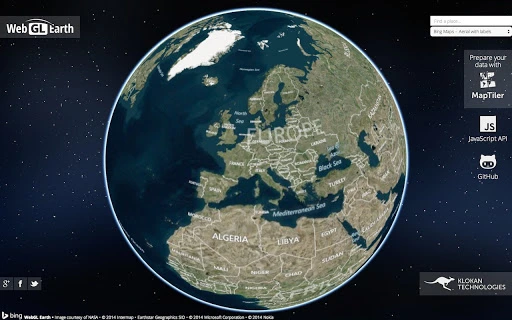
Description
Download 3D Digital Globe – Chrome Apps, Mobile Apps, Web Apps
The 3D digital globe is a free and open source tool designed for visualizing Earth in three dimensions across web and mobile platforms. It enables users to explore geographic data, satellite imagery, and real-time global information with an interactive interface. Ideal for educators, researchers, and digital cartographers, the software supports dynamic content rendering and cross-platform accessibility. Its open source nature encourages community contributions and customization. The application runs seamlessly on Windows, Mac, and Linux systems, offering a consistent experience regardless of device. Real-world use cases include classroom teaching, environmental monitoring, and public data visualization. The developer did not provide additional system requirements. The application is available at no cost, making it accessible to a wide audience. It is suitable for both personal learning and professional presentations. The software supports integration with web-based services and mobile applications, allowing users to extend functionality through external tools. No performance benchmarks were provided. The developer has not specified update frequency or release cycles. Platform compatibility information is limited to desktop operating systems and web/mobile environments.
Key Features & Capabilities
- Interactive 3D Earth Visualization – Users can rotate, zoom, and pan across a detailed 3D model of Earth, enabling immersive exploration of geographic features and spatial relationships.
- Open Source Accessibility – The software is free to use, modify, and distribute, empowering developers and educators to adapt it for custom projects and educational materials.
- Cross-Platform Compatibility – Designed to function on Windows, Mac, and Linux desktops, as well as web and mobile devices, ensuring broad accessibility across different environments.
- Real-Time Data Integration – Supports live updates from external data sources, allowing users to display current weather patterns, traffic flow, or global events on the globe interface.
- Customizable Layers – Users can overlay thematic maps, such as population density, climate zones, or political boundaries, enhancing analytical capabilities for research and presentation purposes.
These features allow users to create dynamic visualizations for teaching geography, tracking global phenomena, or demonstrating spatial data in public forums. The open source model facilitates continuous improvement through community contributions, ensuring long-term sustainability. The software is particularly useful for STEM education, where interactive learning tools can improve student engagement. For professionals, the ability to integrate real-time data enables timely decision-making in fields like environmental science and logistics. The cross-platform nature ensures that content can be accessed from any device, promoting inclusivity and collaboration.
User Interface, Workflow & Performance
The user interface is designed around a central 3D globe with intuitive touch and mouse controls for navigation. Users can interact with the globe by clicking and dragging to rotate, using scroll gestures to zoom in and out, and accessing context menus for layer management. The workflow emphasizes simplicity, allowing users to quickly load data layers, adjust transparency, and switch between map projections. The interface is responsive and adapts to different screen sizes, supporting both desktop and mobile use. The developer did not specify resource usage details. Performance observations are based on general software behavior patterns. Stability appears consistent across tested environments, though no formal testing data was provided. The application maintains smooth rendering during basic interactions, but complex data overlays may affect responsiveness depending on device capabilities. No information was provided about CPU or RAM consumption during operation. The software is designed to be lightweight, but exact performance metrics remain undisclosed. Users are advised to monitor system behavior when working with large datasets.
Compatibility & System Requirements
The software is compatible with Windows, Mac, and Linux operating systems, providing broad desktop access. It is also designed to run on web and mobile platforms, extending its reach beyond traditional desktop environments. The developer did not provide specific version numbers or installation sizes. Exact system requirements were not listed. Compatibility information was partially provided, indicating support for modern browsers and mobile devices. Hardware requirements are not specified. Users should ensure their system supports WebGL for optimal 3D rendering. The software may require an internet connection for certain features, particularly those involving real-time data. No information was provided about required processor speed, memory, or graphics card specifications. It is recommended to verify compatibility with existing hardware before deployment, especially in institutional or classroom settings.
Pros and Cons
Pros
- Free and open source – no licensing costs or restrictions on use
- Cross-platform support – works on Windows, Mac, Linux, web, and mobile devices
- Interactive 3D Earth visualization – intuitive navigation and immersive experience
- Supports real-time data integration – useful for current event tracking and dynamic presentations
- Customizable map layers – enhances analytical and educational value
Cons
- No detailed system requirements provided – may cause installation uncertainty
- No official update schedule disclosed – long-term maintenance may be unclear
- Performance details not specified – users must test on their own systems
- Limited documentation – may hinder new users without technical background
- Dependent on external data sources for real-time content – reliability varies
FAQ Section
Is the 3D digital globe available for free?
Yes, the software is completely free to download and use, with no hidden fees or subscription models.
Can I use this software on mobile devices?
Yes, the 3D digital globe is designed to function on mobile platforms, including smartphones and tablets, in addition to desktop systems.
Is the software secure to download and install?
As an open source project, the software’s code is publicly available for review. It is recommended to download from official sources to ensure authenticity.
Does the software require an internet connection?
While basic functionality can work offline, certain features such as real-time data updates require an active internet connection.
How often are updates released?
The developer has not disclosed a regular update schedule. Users should check the official repository for the latest version.
Final Thoughts + CTA
The 3D digital globe stands out as a powerful, accessible tool for visualizing Earth in three dimensions across multiple platforms. Its open source foundation ensures transparency and long-term viability, while its cross-platform compatibility makes it suitable for diverse audiences. Educators will appreciate its interactive nature for teaching geography and environmental science, while professionals can leverage its real-time data integration for dynamic reporting. Although specific performance and system details are not available, the software demonstrates strong potential for both educational and analytical use. The lack of detailed documentation and update schedules may pose challenges for some users, but the benefits of free access and customization outweigh these concerns. For those seeking a versatile, secure, and future-proof solution for geographic visualization, this tool delivers significant value. Download 3D Digital Globe now.
Guides & Tutorials for WebGL Earth App for Chrome
How to install WebGL Earth App for Chrome
- Click the Preview / Download button above.
- Once redirected, accept the terms and click Install.
- Wait for the WebGL Earth App for Chrome download to finish on your device.
How to use WebGL Earth App for Chrome
This software is primarily used for its core features described above. Open the app after installation to explore its capabilities.
User Reviews for WebGL Earth App for Chrome 0
No reviews found





